How to write a design brief that gets results first time
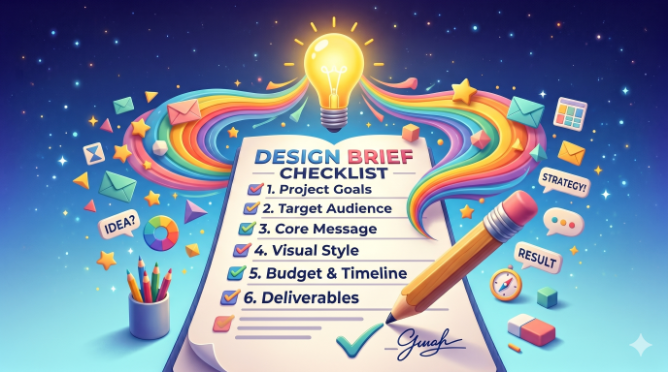
TABLE OF CONTENTS

TL;DR
A design brief that gets results first time isn't necessarily long. It's specific. Cover the project goal, the target audience, brand assets, final copy, dimensions, visual direction, and what to avoid. The briefs that cause the most revision rounds skip the audience description and skip the "what not to do." Include both. The template in this guide is what we recommend to every client who submits a design request to ManyPixels.
Most design briefs fail at the same place: they describe what the output should look like instead of explaining who it's for and what it needs to do. "We need a logo that looks professional and modern" is not a brief. It's a wish. A designer can't make a single informed decision from it.
After processing over 150,000 design projects for 2,000+ clients, we've seen every kind of brief. The ones that result in first-draft approval share specific qualities. The ones that spiral into five revision rounds share specific qualities too. This guide covers both.
{{GRAPHIC_BANNER="/dev/components"}}
What is a design brief?
A design brief is a document that gives a designer the information they need to start work on a project. It covers what needs to be designed, who it's for, what it needs to communicate, and any constraints like brand guidelines, deadlines, or format requirements. A good brief is typically one to two pages. A great one is shorter and more specific.
The brief sits between you and your designer. Without one, the designer guesses. With a bad one, they guess selectively. With a good one, they make informed decisions and produce work that hits the mark on the first draft.
🔔 Worth knowing: a design brief is not the same as a creative brief. A creative brief is used for larger campaigns and includes messaging strategy, competitive positioning, and audience psychology. A design brief is more focused. It gives a designer what they need for a specific deliverable. For a logo, a landing page, or a social media graphic, a design brief is what you need.
Why most design briefs fail (and what we learned from 150,000+ projects)
Most design briefs describe the output and skip the problem. "We need a logo that looks modern and professional" tells the designer nothing about who will see the logo, what they should feel when they do, or what the brand actually stands for. It hands the designer a list of adjectives and calls it direction.
At ManyPixels, we process thousands of design requests every month. The pattern is consistent: requests that come back for three or four revision rounds describe the aesthetic without explaining the context. Requests that get approved on the first or second draft describe the audience, the purpose, and the constraints.
There's a second failure point: vague inspiration. Sharing a Pinterest board with 40 images and writing "something like this" is not useful direction. What specifically do you like about those images? The color palette? The typographic hierarchy? The mood? Without that explanation, the designer makes a guess. It probably won't match what you had in mind.
The third failure point is unfinished copy. If a design needs text, every word needs to be final before the brief is submitted. Adding a sentence to a finished design often requires rebuilding the layout. That's not a small revision, and a designer is well within their rights to charge for it.
What to include in a design brief: 7 things that actually matter
Not all brief sections carry equal weight. These seven are the ones that determine whether a project goes smoothly or sideways.
1. The project goal (not a description of the output)
Start with why this design needs to exist. What should it achieve? Who will see it and where? A brief that answers "what do you want" without answering "why do you want it" is half a brief.
Bad: "We need a Facebook ad."
Good: "We need a Facebook ad to drive sign-ups for our free trial. The audience is marketing managers at B2B SaaS companies. The goal is clicks, not brand awareness."
2. The target audience (specific, not "everyone")
Describe the person who will see this design. Role, industry, what they care about, what they're skeptical of. The more specific you are, the better decisions your designer can make about tone, visual complexity, and style.
Bad: "Our target audience is businesses of all sizes."
Good: "Our buyers are operations managers at logistics companies, typically 35 to 50 years old, skeptical of anything that looks too flashy. They respond to clarity and professionalism over creativity."
3. Brand assets and guidelines
If you have a brand guide, share it. If you don't, provide your logo files, color hex codes, approved fonts, and any past designs the new work should stay consistent with. Without this, the designer makes guesses about your brand that you'll correct through revision rounds.
If this is a new brand with no existing guidelines, say so explicitly. That tells the designer they have creative latitude and stops them from holding back.
4. All the copy, final version
Every word that will appear in the design needs to be in the brief. Headline, subheadline, body copy, CTA, disclaimer, URL. Don't send placeholder text with a note to "finalize later." Changing copy after a design is built is not a small revision. It often means rebuilding the layout from scratch.
5. Dimensions and format requirements
Be specific. Pixel dimensions for digital, millimeters or inches for print, and file format requirements (JPG, PNG, PDF, SVG). If you need multiple sizes of the same asset, list every one upfront. "And also a square version" after delivery is extra work, not a quick tweak.
If you don’t know the exact dimensions it’s fine to say what the design is (e.g. business card) and a professional designer will know the right or most common size specs.
6. Visual direction with explained inspiration
Reference images are useful. Reference images with explanations are far more useful. Don't just share a Dribbble link. Write one sentence about what specifically appeals to you. "I like the type hierarchy in this example, but I want a warmer color palette" is actionable. "Something like this" is not.
Also include what you don't want. If a competitor uses a visual style you want to differentiate from, name them. "We want to avoid anything that looks similar to [Competitor X]" saves a revision round.
7. What success looks like
"It needs to feel premium" is hard to verify. "It needs to look credible enough that a CFO at a 200-person company would take it seriously" is a test a designer can actually apply to their own work. Give your designer a filter, not just a feeling.
How to write a design brief step by step
You don't need a special tool. A Google Doc, a Notion page, or a well-organized email all work. Here's how to build a brief from scratch in eight steps.
Step 1: Start with the goal, not the deliverable. Before writing anything, answer: what is this design supposed to do? What does a successful outcome look like? Write that at the top. Everything else flows from it.
Step 2: Describe your audience in two to three sentences. Who will see this? What do they care about? What would make them trust or distrust the brand?
Step 3: List every deliverable with exact dimensions. Don't assume the designer knows standard ad sizes or print bleed requirements. Write them out. If you need multiple formats, list every one.
Step 4: Paste all final copy. Every word. Including the fine print. If it isn't final, don't submit the brief yet.
Step 5: Attach brand assets. Logo files, color hex codes, font names, and a link to your brand guide if you have one. If you don't have a brand guide yet, that's worth building before you scale up design requests.
Step 6: Add two to three visual references, each with a one-sentence explanation. What specifically do you like about it? Color? Layout? Tone? Be precise.
Step 7: Add a "what to avoid" note. One or two sentences. Competitors whose style you want to differentiate from. Colors you've ruled out. Approaches that have been tried before and didn't land with your audience.
Step 8: Add your deadline and review constraints. Who needs to approve the design? Is there a sign-off process that will affect the timeline? The designer can't plan around information they don't have.
That's the whole brief. Eight points. If it runs longer than two pages, it's probably overloaded in the wrong places.
One pattern we see at ManyPixels: clients who submit briefs consistently over time produce better results with shorter briefs as the relationship develops. The designer learns the brand. As Katya Sarmiento, founder of Reach and Make Millions, put it after 187+ completed projects: "Working with the same designer has been a game changer. She understands my vision so well, I can give minimal direction and still get it right the first time." A good brief trains your designer. That investment pays off in every project that follows.
Design brief template: copy, paste, and fill in 💡
Use this template for any design project. Delete sections that don't apply. Don't add sections you don't need. A completed template is a brief. A template with placeholder text is not.
Good vs. bad design brief: real before-and-after examples
The difference between a brief that causes revision rounds and one that doesn't is usually visible in the first three lines. Here are three common brief sections rewritten to show what "specific" actually looks like.
Project goal
❌ Before: "We need a logo that looks professional and modern."
✅ After: "We need a logo for a B2B SaaS company targeting HR directors at companies with 100 to 500 employees. The brand should feel credible and approachable. Think: serious enough for a procurement decision, warm enough for an HR director who values culture. Not a fintech, not a startup."
The "before" brief could describe 10,000 companies. The "after" gives the designer a person to design for and a tone to hit.
Target audience
❌ Before: "Our target audience is businesses of all sizes who need our product."
✅ After: "Our buyers are marketing managers at e-commerce companies, typically 28 to 40 years old, stretched thin and skeptical of anything that creates more work. They respond to copy-light designs that get to the point fast. Dense layouts lose them."
The "before" tells the designer nothing. The "after" tells them everything they need to make a layout decision, a typography decision, and a visual density decision.
Visual direction
❌ Before: "Something clean and minimal." [Link to Pinterest board with 40 images]
✅ After: "Reference 1: Figma's homepage. I like the type hierarchy, the spacing, and the muted color palette. Not the geometric illustration style. Reference 2: Linear's marketing site. The grid discipline and dark-mode feel are right, but we'd want a lighter version. Avoid: anything that looks like a fintech app or a generic SaaS tool."
"Clean and minimal" is one of the most common phrases in design briefs and one of the least useful. It means something different to every designer. References with explanations mean something specific.
How to write a design brief for specific project types
The template above works for most projects. These three project types have additional considerations worth noting before you start.
Logo design brief
Logo briefs need more brand context than most other project types because a logo has to work across everything: business cards, websites, social profiles, signage, merchandise. In addition to the standard brief, include where the logo will be used and at what sizes, whether this is a new brand or a rebrand, and what the existing brand looks like if it's a rebrand.
A logo design brief should also specify every variation needed upfront: primary logo, a stacked or horizontal alternative, icon-only version, and whether you need a wordmark separate from the icon. Asking for these after delivery adds rounds and costs.
Website design brief
Website briefs are the most complex because there are the most decisions to make. Cover which pages need to be designed (list every one), the primary conversion goal of each page, the CMS or platform it will be built on, and whether this is a new build or a redesign. If it's a redesign, note what is not working about the current site. That is often more useful than describing what you want.
Be explicit about mobile requirements. Include examples of navigation patterns, layout structures, and interaction styles you like. A website brief that covers only desktop is half a brief.
Social media design brief
For social media, the brief should specify the platform, the post type (feed, Story, ad), all dimensions, and the copy for each variant if you're running A/B tests. If you're briefing a recurring content series, describe the format once thoroughly and note that it should stay consistent. Future briefs for the same series can then reference the first approved design.
For social media ads specifically, include the audience targeting and campaign objective. A retargeting ad for warm audiences should look different from a cold-audience ad, even if the product and copy are the same.
A note on submitting briefs to ManyPixels
If you're submitting design requests through ManyPixels, the platform walks you through each of these sections when you create a request. You don't need a separate document. The app prompts you for project type, dimensions, copy, brand assets, and visual references. For clients on the Assigned Designer or Design Team plans, your designer is available on Slack to ask clarifying questions before starting, which means even an imperfect brief gets resolved quickly. See current plan details at manypixels.co/pricing.
Frequently asked questions
Bottom line
The briefs that get results first time are not the longest ones. They're the most specific ones. Describe the audience, not just the aesthetic. Attach the brand assets. Include the final copy. Name what you want to avoid. Those four habits alone will cut your revision rounds significantly.
The most common revision cycle we see at ManyPixels isn't caused by a bad designer. It's caused by a brief that described what the design should look like instead of what it should do. Fix that, and the first draft gets a lot closer to the final one.

Having lived and studied in London and Berlin, I'm back in native Serbia, working remotely and writing short stories and plays in my free time. With previous experience in the nonprofit sector, I'm currently writing about the universal language of good graphic design. I make mix CDs and my playlists are almost exclusively 1960s.

Top-quality designers
A complete creative team at your fingertips: graphic and web designers, illustrators, and more.

Lightning-fast turnaround
Get start today and receive your first update on the next business day.

All-inclusive pricing
Unlimited requests and revisions. One flat monthly fee. No surprises.

Flexible & scalable model
No contract. Scale up and down as needed. Pause or cancel at anytime.
Continue reading


Explore some of our best designs
Get inspired by a curated selection of ManyPixels work. Download the portfolio to see what our team can create.